Contribution reserving is one of those SMSF strategies that sounds too good to be true: the fund receives a contribution in one financial year, but you can have it count toward the following year's cap. It's legitimate, available only to SMSFs, and can save you from an excess contribution when something lands late in June. But the ATO is strict on how and when you do it. Get it wrong and they'll treat the contribution as allocated when received.
How contribution reserving works
In a normal super fund, contributions are allocated to your account as soon as they're received. If $20,000 hits the fund on 28 June, it counts toward the current financial year's cap. No choice.
SMSFs have more flexibility. When a contribution is received, the trustees can hold it in a "contributions reserve" instead of allocating it straight away. The money sits there until the new financial year starts on 1 July, then it's allocated to the member. Because the allocation happens in the new year, it counts toward the new year's cap.
The critical timing rule
This is where most people get it wrong. The decision to reserve must be made before the contribution is received. You can't receive the money, realise it will push you over the cap, and then decide to reserve it. The ATO has been clear: no retrospective reserving. Auditors check for this.
So you need a trustee resolution dated before the contribution arrives. The resolution should say that contributions received after a certain date (typically late June) will be held in the contributions reserve and allocated in the following financial year. If the contribution arrives on 28 June but your resolution is dated 29 June, the reserving is invalid.
⚠️ Timing: The trustee resolution must be dated before the contribution is received. You cannot retrospectively decide to reserve. Get it wrong and the ATO will treat the contribution as allocated when received.
What has to be in place
Your trust deed must permit contribution reserves. Not all deeds do, especially older ones. Check the deed or ask your SMSF administrator. If it doesn't allow reserving, you may be able to amend it, but that takes time. Do it well before you need to use it.
The contribution must be allocated within 28 days of the start of the new financial year. So by 28 July. You can't leave it in reserve indefinitely. Miss that deadline and the ATO may treat it as allocated in the year it was received.
You also need proper documentation: the trustee resolution (dated before the contribution), records showing the contribution was received and held in reserve, and a later resolution allocating it to the member in the new year. Your fund's accounts should clearly show the reserve and the movement of funds.
When it helps
The most common use is unexpected late-year contributions. A catch-up SG payment in June, or a bonus that triggers an extra employer contribution. If you've already used your cap, reserving can stop you going over. Note: whether you can reserve employer SG in practice depends on your deed and how your employer pays; not all contributions are reservable. Your SMSF specialist or accountant can confirm.
Reserving can also be used for timing. You might want the tax deduction for a personal deductible contribution in the current year (contribute before 30 June) but have it count toward next year's cap because this year's is already used. The tax side of that can get fiddly. That's something to work through with an SMSF specialist or financial adviser.
When it doesn't work
You can't reserve everything. Some contributions (including certain employer SG and some salary sacrifice arrangements) may need to be allocated when received. Your deed and the terms of the contribution matter. And reserving only works if you plan ahead. The resolution has to predate the contribution. By the time you realise you have a problem, it's often too late.
Reserving is also SMSF-only. Industry and retail funds don't offer it. The contribution is allocated when received.
Worth doing now: If you might get late-year contributions, check your deed and put a standing resolution in place each year (e.g. in May or early June). Update the dates and caps annually. Then if something lands on 29 June, you're already covered.
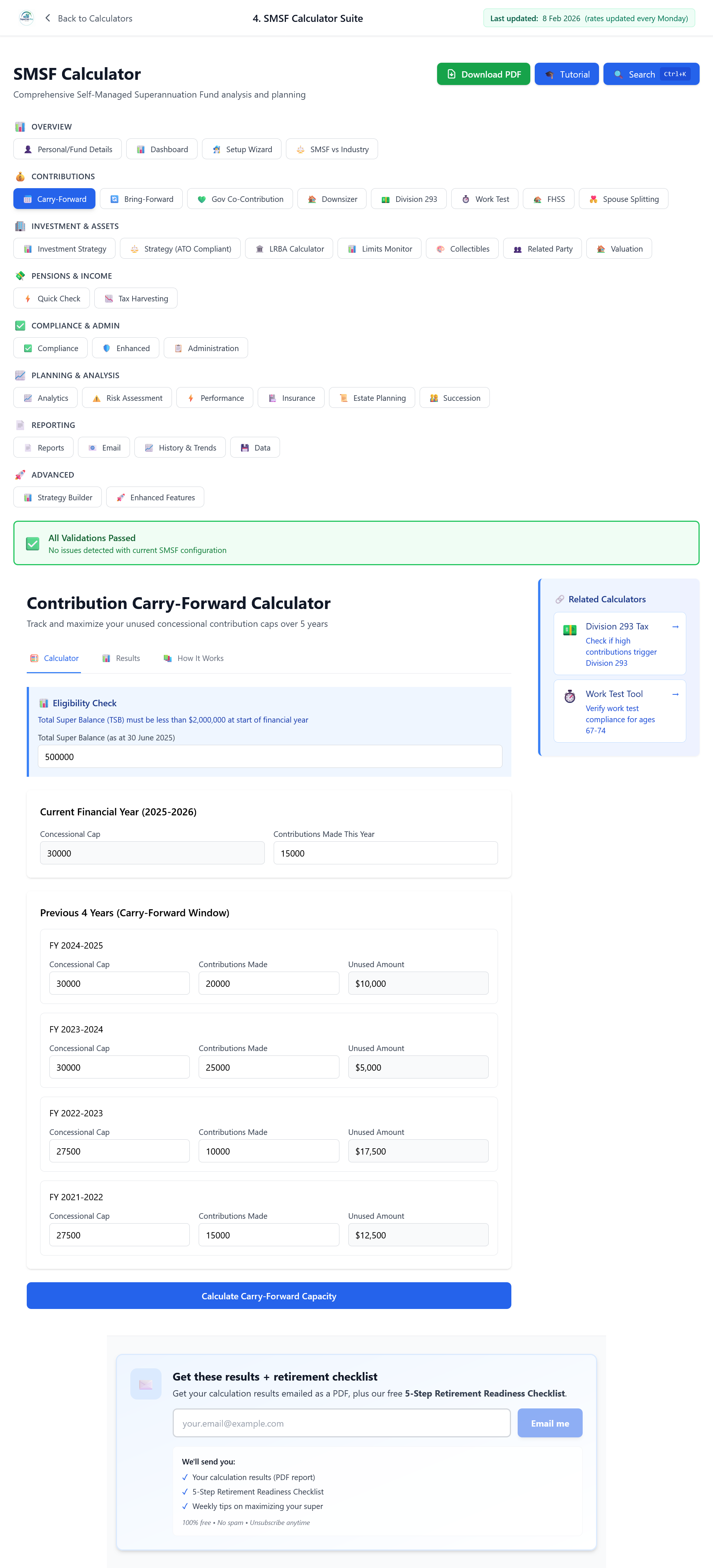
If you're keeping an eye on cap usage anyway, having concessional and non-concessional for the year in one place makes it easier to see how much room you've got before any late June payments land. In our SMSF calculator the Dashboard shows each member's FY contributions, and the Carry-Forward screen (below) shows current year cap, contributions made and remaining space. Handy when you're deciding whether you need a reserving resolution in place.
Know your cap position before late June
The SMSF Suite's Carry-Forward screen shows your current-year concessional contributions vs the $30,000 cap. The Bring-Forward screen shows your non-concessional position. Check both in May or early June so you know whether to prepare a reserving resolution — before any late payments land.
Check Your Cap Position — Open the SMSF SuiteDisclaimer: This article is for general information only. It is not financial product advice under the Corporations Act 2001 and is not tax or legal advice. SuperCalc Pro Pty Ltd does not hold an AFSL. Contribution reserving has strict timing and documentary requirements. You should get advice from a licensed financial adviser, SMSF specialist or accountant before implementing reserving in your own fund.